Best AI Coding Assistants for Developers
GitHub Copilot, Cursor, Devin Desktop, Claude Code, Replit and Tabnine compared by how developers actually work — editor support, agents, codebase context, privacy, pricing models and safe workflows.

This guide was researched and drafted with the help of AI tools, using the official sources cited in the article. Product details change often — see our editorial policy for how we check and update content.
AI coding assistants have moved far beyond autocomplete. Today’s tools plan multi-file changes, run tests, fix their own errors, review pull requests and work on tickets in the background. They also changed significantly in 2026: new pricing models, acquisitions and rebrands.
This guide compares the leading options by how they fit into a developer’s workflow, and explains the practices that make AI-generated code safe to ship.
Four kinds of AI coding tools
- Assistants inside your existing IDE — completions, chat and agents as an extension. Example: GitHub Copilot, Tabnine.
- AI-native editors — editors rebuilt around AI. Examples: Cursor, Devin Desktop (formerly Windsurf).
- Terminal and background agents — agents that work across your repository from the command line or in the cloud. Examples: Claude Code (included with Claude paid plans), OpenAI’s Codex (included with ChatGPT plans), Copilot’s coding agent, Cursor’s and Devin’s cloud agents.
- Cloud app builders — describe an app and get it built and hosted. Example: Replit.
Many developers combine two: for example, an editor assistant for daily work plus a terminal or background agent for larger tasks.
Comparison table
| Tool | Type | Editors | Free option | Paid from | Notable 2026 change |
|---|---|---|---|---|---|
| GitHub Copilot | IDE assistant + agents | VS Code, Visual Studio, JetBrains, Xcode, Eclipse, Vim and more | Yes | $10/month | Usage-based AI Credits since June 2026 |
| Cursor | AI-native editor | Cursor (VS Code fork) | Yes | $8/month (Plus) | New plan lineup; acquired by SpaceX |
| Devin Desktop | AI-native editor | Devin Desktop (VS Code-based) | Yes | $20/month | Renamed from Windsurf; Cascade replaced by Devin Local |
| Claude Code | Terminal/IDE agent | Terminal plus IDE integrations | No (requires Claude Pro or Max) | $20/month (Claude Pro) | Included with Claude paid plans |
| Replit | Cloud builder + agent | Browser and mobile | Yes | $20/month (Core) | Teams plan retired |
| Tabnine | Enterprise IDE assistant | Most major IDEs | Not confirmed | Enterprise pricing | Acquired by Tricentis |
Based on official pages checked in October 2026. Pricing models increasingly combine subscriptions with usage limits — see each review for details.
How to choose
Which editor does your team use?
If developers use JetBrains, Visual Studio or Xcode, or a mix of editors, Copilot (or Tabnine for enterprises) is the practical choice. If everyone is on VS Code and open to switching, Cursor and Devin Desktop offer deeper integration.
How big and complex is the codebase?
Large codebases benefit from strong repository indexing and project rules. Test each tool on your real repository — demo projects are misleadingly easy.
Do you want suggestions or delegation?
Completions and chat keep you in control line by line. Agents make larger changes; background agents work while you do something else. More delegation means more review effort.
What are your privacy and governance needs?
Check whether code is retained, whether it’s used for training, whether you can enforce privacy settings for the whole team, and whether self-hosting is possible. Regulated organizations often prioritize Tabnine or Copilot’s business plans for this reason.
How predictable must costs be?
Usage-based billing is now common (Copilot’s AI Credits, Cursor’s usage pools, Replit’s agent billing). Heavy agent use can cost more than the headline price. Set spending limits and monitor usage.
A safe workflow for AI-generated code
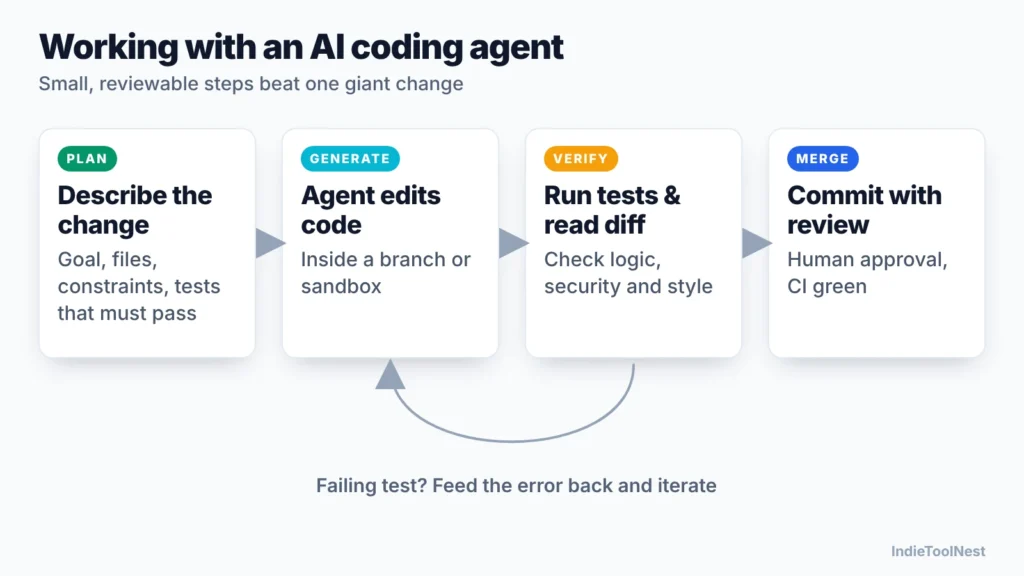
- Work in a branch (or sandbox) so every change is reviewable and reversible.
- Describe the task precisely: goal, files involved, constraints and the tests that must pass.
- Keep changes small. Several focused changes are easier to review than one large one.
- Run tests and linters, and read the diff — don’t just check that tests pass.
- Check security-sensitive code (authentication, input validation, secrets, dependencies) with extra care and automated scanning.
- Review before merge through your normal pull-request process.
Example task prompt:
Add input validation to the signup endpoint: email must be valid, password at least
12 characters. Return 422 with field-level error messages. Follow the validation
pattern used in /api/profile. Add tests for each rule. Don't modify unrelated files.
Recommendations by developer type
- Professional developer on a team using GitHub: start with GitHub Copilot; try Cursor if you’re on VS Code and want deeper AI integration.
- Indie developer or startup moving fast: Cursor or Devin Desktop, plus Claude Code for larger agentic tasks.
- Enterprise with strict privacy requirements: Tabnine or Copilot Business/Enterprise, after a security review.
- Beginner or non-developer building an app: Replit, with a developer review before handling real user data.
- Learning to code: use completions sparingly at first — ask the assistant to explain rather than write, so you build understanding. Check GitHub’s education offers.
Common pitfalls
- Trusting passing tests: agents sometimes change tests to make them pass. Review test changes closely.
- Hidden complexity: AI can add unnecessary dependencies or abstractions.
- Outdated APIs: models may suggest deprecated libraries or methods.
- License concerns: enable filters that block suggestions matching public code where available, and follow your organization’s policy.
- Secrets exposure: never paste credentials into prompts; keep them out of repositories agents can read.
Frequently asked questions
What is the best AI coding assistant?
For most teams, GitHub Copilot is the safest default because of its editor support and GitHub integration. Many individual developers prefer Cursor’s AI-native experience. Test both on your own code.
Are AI coding assistants free?
Several have free tiers: GitHub Copilot Free, Cursor, Devin Desktop and Replit Starter. Heavier use requires paid plans.
Will AI coding assistants replace developers?
They change how developers work — more reviewing, specifying and integrating, less boilerplate — but software still needs people to define requirements, make design decisions and take responsibility for what ships.
Is AI-generated code secure?
Not automatically. Treat it like code from a new teammate: review it, test it and scan it, especially for security-sensitive logic.
Conclusion
The best AI coding assistant is the one that fits your editor, codebase and governance needs: Copilot for broad, team-friendly coverage; Cursor or Devin Desktop for AI-native editing; Claude Code and other agents for larger delegated tasks; Replit for building apps from prompts; Tabnine for strict privacy. Whatever you choose, keep changes small, review every diff and let tests — and humans — have the final word.
Related: Cursor vs GitHub Copilot · AI coding assistants category


1 comment