
Cursor vs GitHub Copilot: AI-Native Editor or AI Everywhere?
Cursor rebuilds the code editor around AI; GitHub Copilot brings AI to the editors and GitHub workflows teams already use. We compare agents, context, pricing, ownership and team fit.
IndieToolNest is reader-supported and editorially independent. Some pages may contain affiliate links; they never affect our assessments. Learn how we review tools in our editorial policy and affiliate disclosure.
At a glance
| Criterion | Cursor | GitHub Copilot |
|---|---|---|
| Developer | Anysphere (part of SpaceX's SpaceXAI division since Aug 2026) | GitHub (Microsoft) |
| Form factor | Standalone editor (VS Code fork) | Extension for many IDEs plus GitHub.com and CLI |
| IDE support | Cursor app (macOS, Windows, Linux) | VS Code, Visual Studio, JetBrains, Xcode, Eclipse, Vim/Neovim and more |
| Free plan | Yes — limited agent and chat usage | Yes — 2,000 completions/month plus limited AI Credits |
| Entry paid plan | Plus: $8/month (Cursor models only) | Pro: $10/month |
| Mid-tier | Premium: $30/month | Pro+: $39/month |
| Higher tiers | Super $100; Ultra $200 per month | Max: $100/month |
| Team pricing | Per seat, matching individual tiers | Business $19/user; Enterprise $39/user |
| Usage model | Usage pools; third-party models billed at API list price on Premium+ | AI Credits (since June 2026) |
| Background agents | Cloud agents (Premium and up) | Copilot coding agent (opens pull requests) |
| AI code review | Bugbot (Premium and up) | Copilot code review |
| Data-use controls | Privacy mode; team enforcement | Business/Enterprise data not used for training; public-code filter |
Table cells summarize documented facts from official sources on the review date. Editorial judgments are in the text below and are labeled as such.
Choose Cursor if…
- You want the most AI-centric editing experience available
- You already use VS Code and are happy to switch to a fork
- Tab's multi-line edit predictions would speed up your daily work
- Your organization is comfortable with the 2026 ownership change
Choose GitHub Copilot if…
- Your team uses JetBrains, Visual Studio, Xcode or several editors
- You want AI tightly connected to GitHub issues and pull requests
- You need established enterprise policies, audit and IP indemnity
- You want the lowest-cost paid entry point with broad model choice
Cursor and GitHub Copilot are the two AI coding tools most developers evaluate first, and both changed significantly in 2026. Cursor introduced a new plan lineup and was acquired by SpaceX; Copilot moved to usage-based AI Credits. Underneath, the core difference remains the same: Cursor is an editor rebuilt around AI, while Copilot brings AI into the editors and GitHub workflows you already have.
How we compared them
The table lists documented facts from official Cursor and GitHub pages on the review date (some official pages disagreed on details, which we note in each tool’s review). Productivity claims are editorial assessments; we have not run controlled benchmarks, and results depend heavily on codebase, language and how carefully changes are reviewed.
Overview
Cursor is a fork of VS Code with AI integrated throughout: Tab predicts your next edit, the Agent makes multi-file changes, cloud agents work in the background and Bugbot reviews pull requests. Its developer, Anysphere, became part of SpaceX’s SpaceXAI division in August 2026.
GitHub Copilot works as an extension in most major IDEs, on GitHub.com and in the terminal. It offers completions, chat, agent mode, a coding agent that turns issues into pull requests, and code review — with business plans that integrate into GitHub’s organization controls.
Feature-by-feature comparison
Completions
Both offer inline suggestions. Editorial assessment: Cursor’s Tab is widely praised for predicting multi-line and multi-location edits, which feels different from traditional autocomplete. Copilot’s completions are mature and available in far more editors.
Agents in the editor
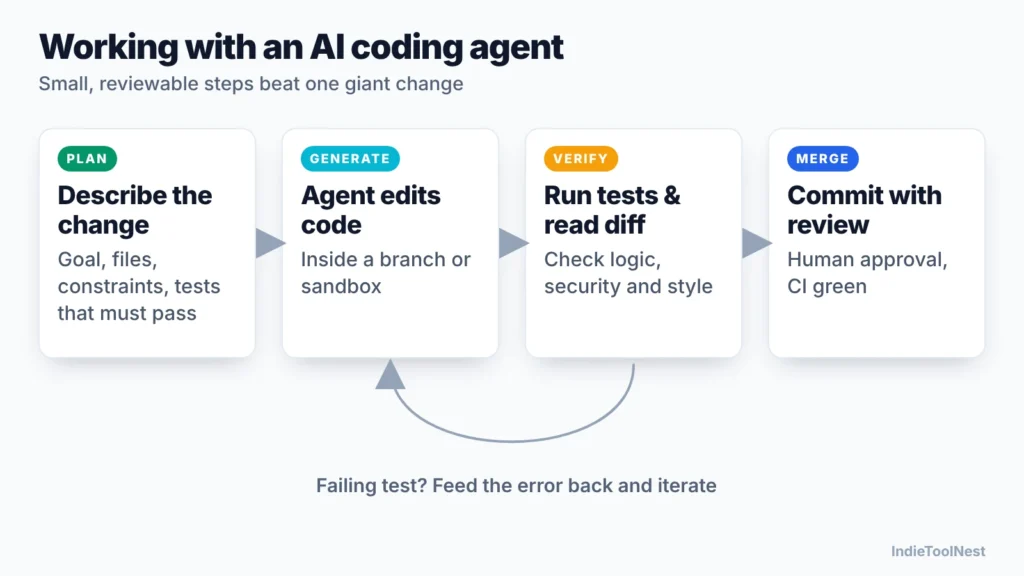
Both have agents that plan, edit files, run commands and iterate. Editorial assessment: Cursor’s agent is tightly woven into the editor’s UI and codebase index; Copilot’s agent mode is strongest in VS Code and continues to expand to other IDEs. Quality varies by task — test both on the same ticket.
Background agents and GitHub integration
Copilot’s coding agent works from GitHub issues and opens pull requests, fitting naturally into team review processes. Cursor’s cloud agents also run tasks in the background and can be launched from several surfaces. Teams centered on GitHub will find Copilot’s workflow more native.
Codebase context and customization
Both index your repository and support project instructions (Cursor Rules; Copilot custom instructions). Copilot Enterprise adds organization-level knowledge features; Cursor offers team rules and settings.
Model choice
Both let you choose models from multiple providers on eligible plans. Cursor’s lower Plus tier is limited to Cursor’s own models, and third-party models are billed at API list price on Premium and up. Copilot’s model access depends on plan and AI Credit allowances.
Pricing differences
- Cheapest paid entry: Cursor Plus ($8) is cheaper but limited to Cursor models; Copilot Pro ($10) includes broader model access within its credit allowance.
- Main professional tiers: Cursor Premium ($30) vs Copilot Pro+ ($39).
- Teams: Copilot Business ($19/user) is substantially cheaper per seat than Cursor’s team tiers, which match individual pricing.
- Usage: both now meter heavy agent use; set spending limits and monitor usage in either tool.
Ease of adoption
For individuals who already use VS Code, switching to Cursor takes minutes. For organizations with mixed IDEs, Copilot is easier to roll out because developers keep their editors. Editorial assessment: procurement and security reviews will generally be simpler for Copilot in companies already using GitHub Enterprise.
Ownership, privacy and governance
Cursor offers privacy mode and team-level enforcement; after the SpaceX acquisition, organizations should re-review data-processing terms. GitHub states that Copilot Business and Enterprise data isn’t used for training and offers a filter to block suggestions matching public code, plus IP indemnity on business plans. Regardless of tool, treat AI-generated code as untrusted until reviewed and tested.
Recommendations by user type
- Individual developers on VS Code: try Cursor first; compare Copilot Pro on the same tasks.
- JetBrains, Visual Studio or Xcode users: Copilot.
- Startups optimizing for speed: Cursor, with careful review practices.
- Enterprises on GitHub: Copilot Business or Enterprise.
- Students: check GitHub’s free Copilot Pro eligibility; Cursor’s free plan is also useful.
- Teams with strict vendor policies: evaluate the ownership change and contractual terms before choosing Cursor.
Frequently asked questions
Is Cursor better than GitHub Copilot?
For an AI-centric editing experience in a VS Code-style editor, many developers prefer Cursor. For multi-IDE teams and GitHub-centered workflows, Copilot is usually the better fit.
Can I use Copilot inside Cursor?
Cursor is based on VS Code, but it has its own AI features; running another AI assistant alongside is possible in some cases but usually unnecessary and can conflict.
Which is cheaper?
Copilot is cheaper for teams ($19/user Business). For individuals, Cursor Plus ($8) is cheapest but limited to Cursor’s models; Copilot Pro is $10.
Bottom line
Choose Cursor if you want the deepest AI integration in your editor and you’re comfortable with its new ownership and plans. Choose GitHub Copilot if your team spans several IDEs, lives on GitHub, or needs mature enterprise controls at a lower per-seat price. Both have free plans — run the same real task in each before committing.
Official sources
- Cursor pricing
- Cursor pricing and plans (Cursor Help)
- GitHub Copilot plans
- Plans for GitHub Copilot (GitHub Docs)
- GitHub Copilot is moving to usage-based billing (GitHub Blog)
Last reviewed on October 25, 2026. Report outdated information.