GitHub Copilot
GitHub's AI coding assistant — code completion, chat and agents in your editor, terminal and on GitHub.com — with a free tier, individual plans from $10/month and business plans.
Status update: Since June 1, 2026, GitHub Copilot uses usage-based "AI Credits" instead of premium requests for most plans. Some annual subscribers remain on legacy premium-request billing.
Research-based review. Based on official documentation, pricing pages, help centers and public announcements. IndieToolNest has not yet published hands-on test results for this tool. How we review
IndieToolNest is reader-supported and editorially independent. Some pages may contain affiliate links; they never affect our assessments. Learn how we review tools in our editorial policy and affiliate disclosure.
GitHub Copilot was the first AI coding assistant to reach millions of developers, and it remains the default choice for many teams because it lives where code already is: in the major editors and on GitHub. It has evolved from autocomplete into a set of agents that can make multi-file changes in your editor or work on an issue in the background and open a pull request.
This review covers Copilot’s capabilities, the 2026 move to usage-based billing and how it compares with AI-native editors like Cursor.
What is GitHub Copilot?
GitHub Copilot is developed by GitHub, which is owned by Microsoft. It launched in technical preview in 2021 and became generally available in 2022. Copilot is available in VS Code, Visual Studio, JetBrains IDEs, Xcode, Eclipse, Vim/Neovim and other editors, on GitHub.com, in GitHub Mobile and in the terminal.
It addresses repetitive and time-consuming parts of software development: boilerplate, tests, unfamiliar APIs, debugging and small refactors — and increasingly, well-defined tasks that can be delegated entirely.
How GitHub Copilot works
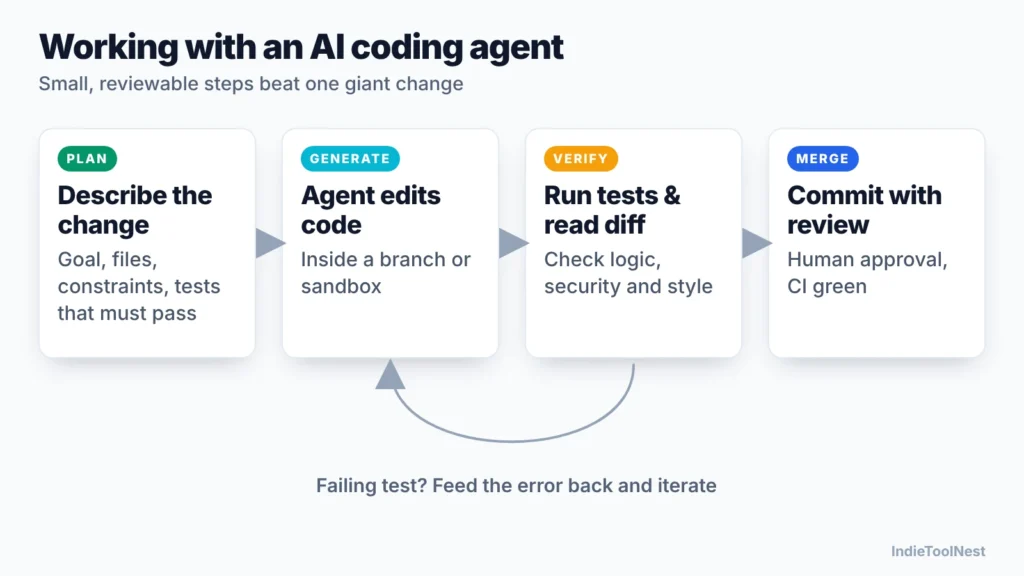
Copilot sends relevant context — the code around your cursor, open files, and for chat and agents, more of your repository — to large language models, which return suggestions. Completions appear inline as you type. Chat answers questions and proposes changes. Agent mode in supported IDEs can plan a task, edit multiple files, run terminal commands and tests, and iterate on failures with your approval.
The Copilot coding agent works asynchronously: you assign it an issue on GitHub, it works in a secure, ephemeral environment powered by GitHub Actions, and it opens a pull request for you to review.
Key features
- Code completionSuggests single lines to whole functions as you type.
- Copilot ChatAsk questions about code, errors and concepts in your editor or on GitHub.com.
- Agent modeLets Copilot plan and make multi-file changes, run commands and iterate in your IDE.
- Copilot coding agentAssign an issue to Copilot and it works in the background to open a pull request.
- Code reviewRequest AI review comments on pull requests.
- Model choiceChoose between models from several AI providers (availability depends on plan).
- Copilot CLI and extensionsUse Copilot in the terminal and extend it with tools and integrations.
Real-world use cases
- Boilerplate and tests: generate unit tests, data models and repetitive code.
- Learning a codebase: ask Chat to explain modules and trace how data flows.
- Bug fixing: paste an error and get a likely cause and fix.
- Delegating small issues: assign well-scoped tickets to the coding agent.
- Pull request review: get an extra set of eyes before human review.
Who should use GitHub Copilot — and who should skip it
Good fit
Copilot suits professional developers and engineering teams already on GitHub, especially organizations that need policy controls, audit capabilities and support across many different editors.
Consider alternatives
Developers who want an editor built around AI from the ground up often prefer Cursor or Devin Desktop (formerly Windsurf). Organizations with strict privacy requirements may compare Tabnine. Beginners building apps from prompts might find Replit easier.
How to get started
- Enable Copilot Free from your GitHub account settings, or choose a paid plan.
- Install the extension for your editor and sign in with GitHub.
- Write a descriptive comment or function name and accept or reject completions.
- Open Chat and ask it to explain a file you didn’t write.
- Try agent mode on a small, test-covered change in a branch.
- Organizations: configure policies (allowed models, public-code matching filters) before rollout.
Example prompts
Explain what this module does, list its external dependencies, and identify any
functions without test coverage. Then write tests for the riskiest one.
Refactor the date-parsing logic in utils/dates.ts into a single function with
clear error handling. Keep the public API unchanged and make sure existing tests pass.
Read our guide to the best AI coding assistants for safe agent workflows.
Plans and pricing
| Plan | Listed price | What it includes |
|---|---|---|
| Free | $0 | 2,000 code completions/month and a limited monthly AI Credit allowance for chat and agent features |
| Pro | $10/month | Includes $10 of monthly AI Credits; unlimited completions; broader model choice |
| Pro+ | $39/month | Includes $39 of monthly AI Credits; access to more models |
| Max | $100/month (listed on GitHub's pricing page) | Larger credit allowance and priority access to new models |
| Business | $19/user/month | Organization management, policy controls, IP indemnity; AI Credits per user |
| Enterprise | $39/user/month (requires GitHub Enterprise Cloud) | Higher credits, enterprise features and knowledge of your organization's code |
Partially verifiedOfficial sources showed conflicting or incomplete figures on the review date. Treat the prices below as indicative and confirm them on the official pricing page. Checked: October 25, 2026. Official pricing page (opens in a new tab)
GitHub moved Copilot to usage-based AI Credits on June 1, 2026. Paid individual plans include a monthly credit allowance roughly equal to the plan price, and organizations get per-user allowances. On our review date, GitHub’s pricing page and documentation showed different totals for some plans (the pricing page appears to include additional flexible allowances), so check both before estimating costs.
Advantages and limitations
Advantages
- Works in almost every popular editor and on GitHub itself
- Background coding agent fits naturally into issue and pull-request workflows
- Business plans add policy controls and IP indemnity
- Free tier and low-cost Pro plan
Limitations
- The June 2026 switch to usage-based AI Credits makes costs less predictable
- Credit allowances differed between GitHub's pages on our review date
- Agent features still require careful human review
- Editor-agnostic design can feel less integrated than AI-native editors like Cursor
GitHub Copilot vs alternatives
- Cursor — AI-native editor. See Cursor vs GitHub Copilot.
- Devin Desktop — Cognition’s agentic editor (formerly Windsurf).
- Tabnine — enterprise and privacy focus.
- Claude — Claude Code as a terminal-based agent.
Privacy and practical considerations
GitHub states that Copilot Business and Enterprise data is not used to train models, and organizations can enable a filter that blocks suggestions matching public code. Individual users should review their Copilot settings for data-use options. Treat AI-generated code like code from a new team member: review it, test it and check for security issues and licensing concerns.
Frequently asked questions
Is GitHub Copilot free?
Yes. Copilot Free includes 2,000 code completions per month and a limited AI Credit allowance for chat and agent features.
What are AI Credits?
Since June 2026, Copilot measures chat and agent usage in AI Credits. Paid plans include a monthly allowance, and usage beyond it may be billed depending on your settings.
Can students use Copilot for free?
GitHub has offered free Copilot Pro to verified students, teachers and maintainers of popular open-source projects. Check current eligibility in GitHub’s documentation.
Does Copilot write secure code?
Not reliably on its own. Review suggestions, run tests and use security scanning, especially for authentication, input handling and dependencies.
Our verdict
GitHub Copilot is the safest default AI coding assistant for teams already on GitHub: it works in nearly every editor, its coding agent fits naturally into issues and pull requests, and business plans provide the controls organizations need. The 2026 shift to usage-based credits means you should monitor costs, and developers who want the most AI-centric editing experience should also try Cursor.
Compare before you choose
Sources and references
- GitHub Copilot plans and pricing
- Plans for GitHub Copilot (GitHub Docs)
- GitHub Copilot is moving to usage-based billing (GitHub Blog)
- GitHub Copilot licenses (GitHub Docs)
- GitHub Copilot Trust Center
Last reviewed on October 25, 2026. Spotted something outdated? Send a correction.